Dictation for every app on your Mac.
Say it messy. We'll write it neat.
Hold Fn and talk in ChatGPT, Claude, Cursor, Slack, Mail or anywhere else you type. SayWrite drops the ums, adds the punctuation, learns your names and jargon, and can polish a ramble into clear writing. It all runs on your Mac.
14 days free · then $30/year or $5/month · card required, no charge until day 15 · cancel anytime · no word limit
On your phone? SayWrite runs on a Mac. Send yourself the link and download it there.
Apple silicon · macOS 15+ · English · What AI Polish needs
- In Mail · Re: Q3 numbers, you say: “so basically the numbers look good but uh we're still waiting on legal so let's not announce until monday”. SayWrite types: “The numbers look good, but we're still waiting on legal. Let's hold the announcement until Monday.”
- In Slack · #launch, you say: “um can we push the demo to thursday the build isn't ready”. SayWrite types: “Can we push the demo to Thursday? The build isn't ready.”
- In Terminal · claude, you say: “okay so refactor the user fetch thing to use async await and um keep the error handling the way it is”. SayWrite types: “Refactor the user fetch function to use async/await, and keep the existing error handling.”
Illustrative examples.
- ≈0.2 s warmstop to result in an archived M5 Pro speech test. Test conditions
- 0 bytesof your audio uploaded for transcription. What does go online
- Offlinedictation keeps working on a plane, with the speech model downloaded and ready
- $30/yrafter a 14-day free trial, with no word limit
See it in 35 seconds
Hold Fn, talk, and it's written. Tap Space and it's polished.
Works right after setup
Dictation
Plain dictation works on any Apple silicon Mac with macOS 15 or later, in English, right after setup.
One-time setup takes about 10 minutes, mostly the speech model download (about 465 MB). Install guide
Optional
AI Polish
AI Polish is optional and off until you turn it on. It needs macOS 26 with Apple Intelligence turned on, or a model you run yourself in Ollama or LM Studio.
How it works
Three steps. No typing.
That's all there is to it once SayWrite is set up. First-time setup takes about 10 minutes.
- 01
Hold Fn and talk
Click into any text field and hold fn. A small pill shows you're live. Or tap once to start and again to stop. It's voice to text that works in every app.
- 02
Let go. It's typed.
Your words appear where your cursor is, with speech processed on your Mac and no audio upload. SayWrite never presses Return for you.
- 03
Want it neater? Tap Space.
Tap space while holding fn and AI Polish turns your ramble into clean writing, with AI that runs on your Mac. What it needs
How it compares
SayWrite vs Wispr Flow vs Apple Dictation
Wispr Flow transcribes in the cloud. Apple Dictation is free, without the cleanup. SayWrite runs on your Mac for $30 a year.
Where Wispr Flow wins: 100+ languages, and Windows and phone apps.
| Feature | SayWrite | Wispr Flow | Apple Dictation |
|---|---|---|---|
| Price and limits | 14-day free trial, then $30/year or $5/month. No word limit. | Free up to 2,000 words a week on desktop; Pro $12–15/monthSource: Wispr Flow pricing | Free, built inSource: Apple Support: Dictate messages and documents on Mac |
| Where speech becomes text | On your Mac | In the cloudSource: Wispr Flow privacy policy | On-device on supported Macs and languagesSource: Apple Support: Dictate messages and documents on Mac |
| Works offline | Yes, with the speech model downloaded and ready | No offline mode describedSource: Wispr Flow privacy policy | When processed on your deviceSource: Apple Support: Dictate messages and documents on Mac |
| AI cleanup | Optional, on your Mac: Apple Intelligence, Ollama or LM Studio | Included; its privacy policy doesn't say which models or whereUnverified | Punctuation and commands; no rewriting describedSource: Apple Support: Commands for dictating text on Mac |
| Languages | English | 100+ languagesSource: wisprflow.ai | Many languagesSource: Apple Support: Dictate messages and documents on Mac |
| Platforms | Mac with Apple silicon | Mac, Windows, iPhone and AndroidSource: wisprflow.ai | Built into macOSSource: Apple Support: Dictate messages and documents on Mac |
Not affiliated; trademarks belong to their owners. Wispr Flow, Apple Dictation, ChatGPT, Claude, Cursor, Visual Studio Code, Slack, Mail, Notes, Google Docs and Terminal are trademarks of their respective owners, and SayWrite is not affiliated with or endorsed by them. Competitor details come from their public websites and documentation as of . Spotted something out of date? Tell us and we'll fix it.
Privacy
Cloud dictation asks you to trust its privacy policy. SayWrite never receives your voice.
Speech becomes text on your Mac's Neural Engine, and the recording is deleted as soon as it's transcribed. Your voice never goes to a server, ours included.
- Recordings deleted right away. Audio exists only while it's transcribed, including when you cancel.
- AI Polish stays local too. Apple Intelligence on your Mac, or your own model. SayWrite refuses any other address.
- No passwords, no telemetry. History and Stats stay on your Mac; password managers are never recorded.
- Your text goes where you put it. After that, the app you typed into applies its own privacy settings.
When SayWrite goes online: speech-model setup or recovery, optional update checks, account and license services, and Send Feedback when you click Send. These are separate from audio transcription. Network details and verification limits
Cloud dictation such as Wispr Flow
- Your voice
- Their serverstranscribe your audio
- Your app
What happens to your audio is up to their policy. Wispr Flow's says transcription always happens in the cloud (Source: Wispr Flow privacy policy).
SayWrite
- Your voice
- Your Macspeech to text on the Neural Engine, recording deleted
- Your app
Speech stays on your Mac. Dictation works offline with the model ready.
Messy in, neat out
From ramble to ready to send.
Plain dictation types what you said, minus the ums. Tap Space while you talk and AI Polish rewrites it into what you meant. Switch between the three versions to compare.
Why not the mic button you already have?
A mic button stops at its own app. SayWrite doesn't.
ChatGPT, Claude and plenty of other apps have their own dictation, and each one only types into itself. SayWrite is one shortcut that works the same way everywhere, and tidies the text before it lands.
One shortcut, every app
SayWrite types wherever your cursor is: AI chats, code editors, Slack, email, docs, even Terminal. Same key, same results.
- ChatGPT
- Claude
- Cursor
- Visual Studio Code
- Slack
- Notes
- Google Docs
- Terminal
Your words, spelled your way
Add names, product terms and jargon to your personal dictionary once, and they come out right in every app. Fix a word after dictating and SayWrite offers to remember it.
- “say right” becomes SayWrite
- “okay ours” becomes OKRs
Clean before it lands
Filler words dropped and punctuation added as you talk. Tap Space for AI Polish when you want a ramble rewritten, and pick a style per app.
- Mail: polished
- Messages: light
- Code editor: word for word
Tell it what to write. Say "write a quick reply saying Thursday works" and get the reply, written out. How it works · See all features →
Beyond dictation
Built for people who talk all day.
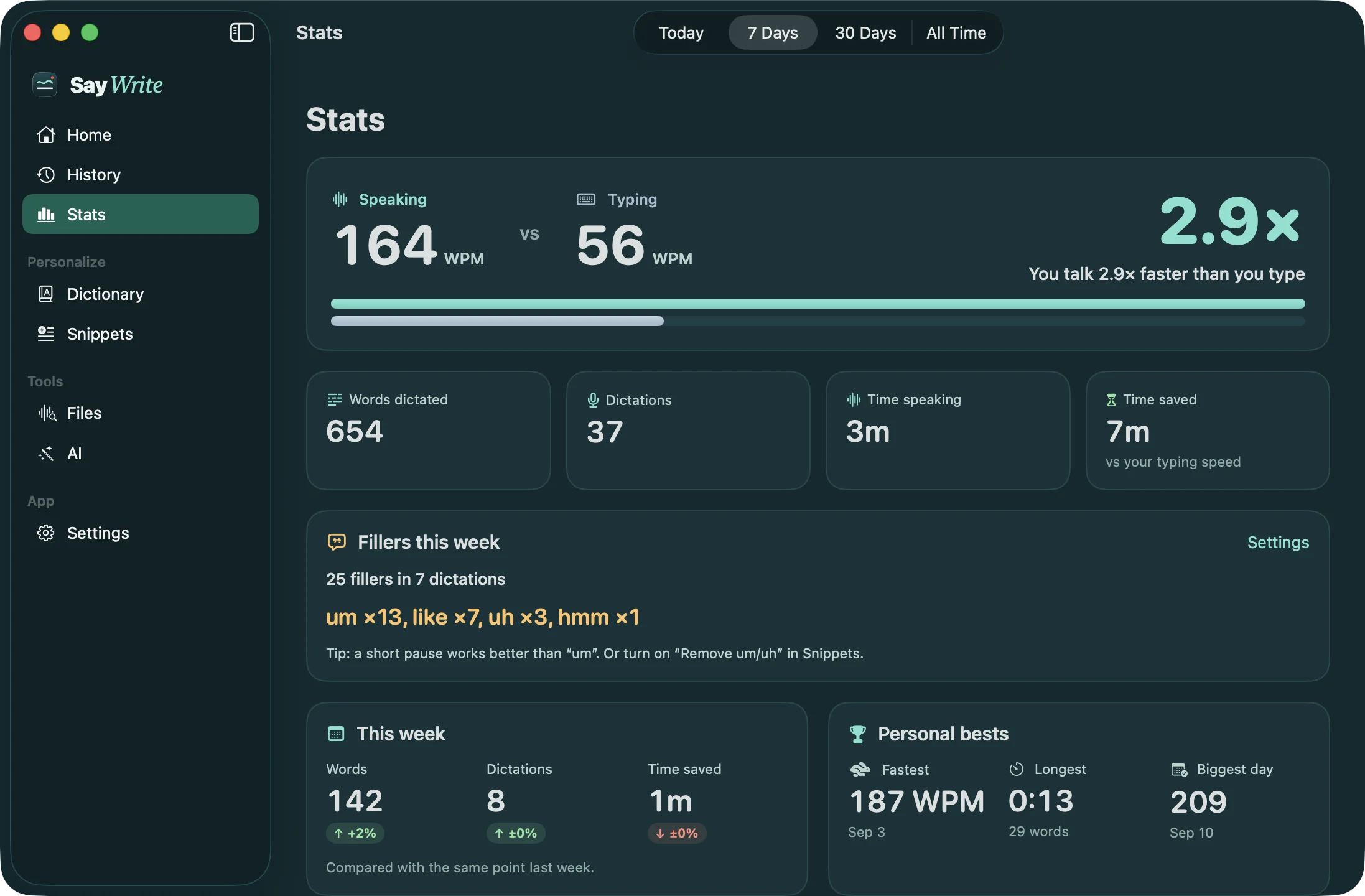
Speaking vs typing
See how much faster you talk than type
SayWrite measures your typing speed and your speaking speed on your Mac and shows the difference, plus words dictated and time saved. Typing speed comes from keystroke timing only; it never records what you type.
Per-app AI Polish
Polish that knows which app you're in
Choose once: Slack and Mail get Polish, Messages gets a light clean-up, code editors get exactly what you said. It happens every time you dictate there. Custom instructions per app are on the way.
Your model
Bring your own local model
Polish with Apple's on-device model, or with a model you run in Ollama or LM Studio on your Mac. No API keys, no cloud.
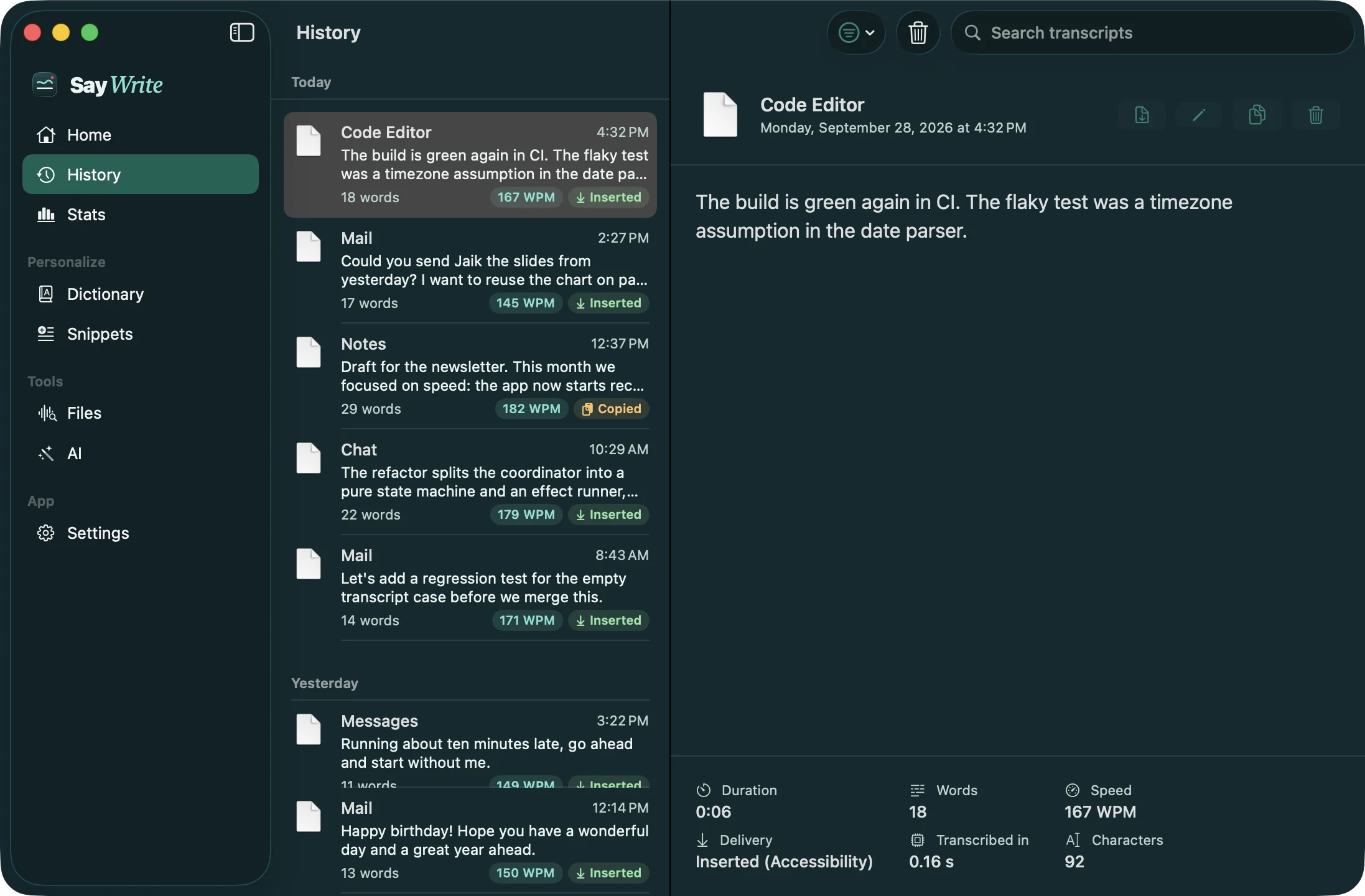
History and editing
History that remembers where you wrote it
Every dictation is saved on your Mac with the app it went to, searchable and ready to paste again. Edit Last Dictation fixes your latest one in an editor and swaps it back in place.
Private
Runs on your Mac. No password.
Speech recognition and AI Polish run on your Mac, and it works offline. There's no password to remember, and SayWrite never uploads what you say.
Price
$30 a year. Wispr Flow Pro is $144.
Unlimited dictation and AI Polish for less than a quarter of what Wispr Flow Pro costs per year. Try it free for 14 days, and cancel anytime.
For tinkerers
Already run local AI? Use your own model.
Optional. If you run Ollama or LM Studio, AI Polish can use your model instead of Apple's. No API keys, no cloud. Most people never need this.
FAQ
Questions, answered
All questions →Not answered here?
Try the guides or the install guide, or email support@saywrite.app. A person reads every message.
What is SayWrite?
SayWrite is a dictation app for Mac that works in every app you type in, from ChatGPT and Cursor to Slack and Mail. You hold the Fn (Globe) key, talk, and clean text is typed wherever your cursor is: filler words dropped, punctuation added, your names spelled your way, and an optional AI Polish that rewrites a ramble into clear writing. It all runs on your Mac, so what you say is never uploaded.
Does SayWrite work offline?
Yes. With the speech model downloaded and prepared (about 465 MB of model files), dictation works with no internet connection. Model-file recovery may require the network. AI Polish also runs locally, using Apple Intelligence's on-device model or your own Ollama or LM Studio server on your Mac.
How much does SayWrite cost?
SayWrite has a 14-day free trial, then costs $5 a month or $30 a year. A card is required to start the trial, but you won't be charged until day 15, we'll remind you 7 days before, and you can cancel anytime in your account. Every plan includes unlimited dictation and AI Polish, with no word limit and no password. Everything runs on your Mac.
Is SayWrite cheaper than Wispr Flow?
Yes. SayWrite is $30 a year (or $5 a month) after a 14-day free trial. Wispr Flow Pro is $144 a year ($12 a month billed annually) or $15 a month, and Wispr Flow's free plan allows 2,000 words a week on desktop, as of September 29, 2026. SayWrite has no word limit on any plan.
Does SayWrite have a word limit?
No. SayWrite has no weekly word limit, no minutes cap and no per-use AI charge, during the free trial or after it. Speech recognition and AI Polish run on your Mac, so there is no cloud cost per word to pass on.
Which Macs does SayWrite run on?
SayWrite needs a Mac with Apple silicon (M1 or later) running macOS 15 Sequoia or later, plus about 465 MB for the speech model and extra space for the app and macOS caches. Intel Macs are not supported. It transcribes English only for now. AI Polish is optional and has its own requirements: macOS 26 with Apple Intelligence, or your own Ollama or LM Studio model.
Is SayWrite private? Does my voice leave my Mac?
SayWrite never uploads your voice. Audio is transcribed on the Apple Neural Engine, kept only in a temporary file while it is processed, and deleted right after. SayWrite has no passwords, no analytics and no telemetry, and it doesn't send your words to any cloud service for transcription or cleanup. Once the text is typed into another app, that app's own privacy settings apply.
How can I check offline dictation and network activity?
Finish setup and prepare the speech model, turn AI Polish off, disconnect Wi-Fi, Ethernet and any phone hotspot, then try a non-sensitive sentence. This tests offline operation, not what happens online. Reconnect and use a network monitor during startup, dictation and idle time; test optional AI Polish separately. Model setup or recovery, updates, account and license services, and Send Feedback use the network. A single lsof snapshot can miss brief connections and cannot reveal encrypted request contents. See the Security page for the method and limits; this is not an independent audit.
How do I start dictating?
Click into any text field, hold the Fn (Globe) key, speak, and let go. SayWrite types the text where your cursor is and never presses Return for you. You can also tap Fn once to start and again to stop, or use Control-Option-D.
Do I need Apple Intelligence or Ollama to use SayWrite?
Not for dictation: plain dictation works on any supported Mac right after setup. Only the optional AI Polish needs a local AI engine: Apple Intelligence's on-device model (macOS 26 or later with Apple Intelligence turned on) or your own Ollama or LM Studio server. AI features are off until you turn them on.
Say it messy. We'll write it neat.
14-day free trial, then $30 a year or $5 a month. Card required; you won't be charged until day 15, and you can cancel anytime. No word limit.
On your phone? SayWrite runs on a Mac. Send yourself the link and download it there.
14-day free trial · card required, no charge until day 15 · macOS 15+ · Apple silicon